Google Apps and Gmail is dropping support for IE 6

In order to take advantage of the new web technologies (mostly HTML5 and faster JavaScript engine), Google is going to phasing out support for IE6. They’ll start with Google Docs and Google Sites, then Gmail and Google Calendar later in 2010. As a result, IE6 will become even slower when using these Google services.

I’m just wondering who uses Gmail intensively is still using the old IE6? As an AJAX powered web mail system Gmail performs 10000 times faster in newer browsers, especially in Google Chrome!

Backup Google Apps Email with Gmail Keeper

Backup Google Apps Email with Gmail Keeper is easy and there is no essential difference between backing up ordinary Gmail accounts and Google Apps accounts, what you need to do is to input your full qualified email address (including the domain name) when setting up the backup profiles, like the screenshot shown below:

Because the nature of easy to use and accessible anywhere, Google Apps email is being adopted  by more and more small to medium businesses nowadays, but putting all eggs in one basket is dangerous and that’s why I have developed Gmail Keeper after I have been using Google apps email  to run my online business for years, I felt the fear of  being unable to access my important emails, do you?

Gmail Keeper (Gmail Backup Software) V1.3.9.274 is released

A new version of Gmail Keeper is now available, the latest version is 1.3.9.274 and the following is a list of changes/enhancements made since the last announcement:

  1. Allow ignore big emails when backing up emails from Gmail server.
    Big emails (usually with large attachments) sometimes  cause unexpected connection error that is initiated by Gmail server, if you having problems backing up your Gmail and Gmail Keeper reports ‘Unknown 313 error’, try to take advantage of this option. See screenshot below:
  2. More reliable Gmail backup and Gmail restore operations.
    This is achieved by automatically decreasing the number of email headers to retrieve at a time when getting email headers from Gmail server in order to identify new emails to download. I guess the source of the problem is that Gmail server unexpectedly terminates a IMAP connection if a client consumes too much (how much? No one knows) bandwidth in a given time.
  3. Fixed a new bug that’s introduced in the last version: Restore will not continue if the ‘All Mail’ folder cannot be found in the target account (in case of the display languages in the source and target account is not the same)
  4. Allow continue to restore to a Gmail account  even if the display languages are different in the source and target accounts. Note: If you choose to continue restore to Gmail in this case the sent emails will not be able to put in your ‘Sent Mail’ folder.
  5. Fixed: Gmail Keeper incorrectly shows message ‘Your Gmail language is not English’ which is caused by extra email folders that are created under the ‘[Gmail]‘ or ‘[Google Mail]‘ folder (these folders are usually created with other Email client programs).
  6. Changed:  Remove the size information in the profile setup window, to increase the speed when fetching folders and labels from a Gmail account.
  7. The ‘Number of email headers to download each time’ in the Options window is not  saved after that window is closed.

Backup Google Calendar?

People want to backup their Google calendar data

From time to time, I got emails from paid/prospect customers of Gmail Keeper asking if Gmail Keeper can backup their Google calendars, but unfortunately the answer is no (currently).  For now Gmail Keeper can only reads emails from your Gmail and Google Apps accounts and save them to disk and then zip them, it does not read Google calendar data.

Will Gmail Keeper support backup Google calendar?

Answer:  It depends on  how many requests for Google calendar data backup will I still get in the future.  Or if I start using Google Calendar myself, maybe I’ll need to find a way to backup the calendar myself ;)

Another question I need to consider is that how to store and view the calendar data locally, let me know if you have any comments.

Gmail chats backup

Google does not open Gmail chats API

We are constantly receiving requests from Gmail Keeper users for backing up Gmail chats history with Gmail Keeper, it seems that the chatting feature in Gmail (including Google Apps) is commonly being used, but unfortunately, since Google does not currently open the API (application programming interface) which allows downloading chats history from a Gmail account, it’s currently impossible to do that technically.

Gmail Keeper will backup Gmail chats in the future

The good news is, as soon as Gmail server opens an interface for accessing chats history to third party programs, we’ll follow up immediately, to add the Gmail chats backup function to Gmail Keeper, so ,eep an eye on Gmail Keeper ;)

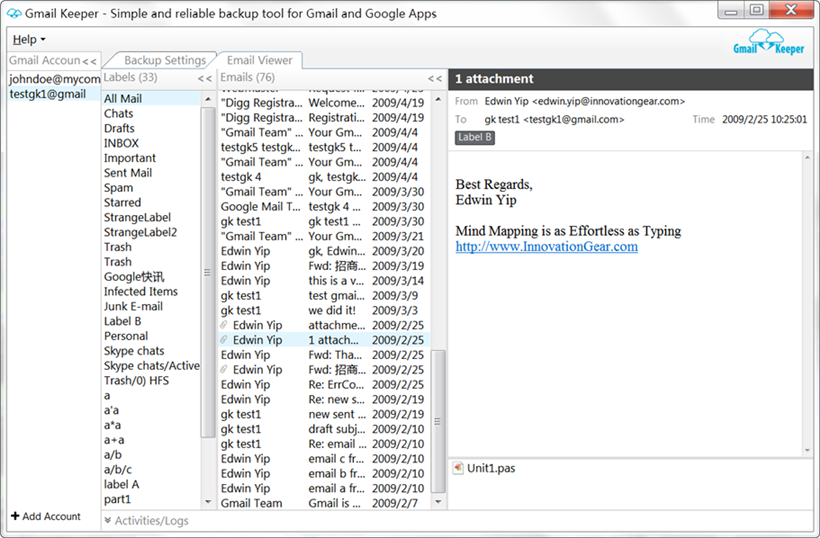
Currently it can backup emails from all folders and labels from your Gmail account, and the labels are reserved in the local backup data, currently you can see the associated Gmail labels with modern zip archiver program (e.g. the free 7-zip), but in future versions will be able to view and search the local backup data with Gmail Keeper by using a Gmail-like interface.

Gmail Keeper v1.3.5 makes it easier to backup Gmail accounts with large amount of emails

There are 3 enhancements has been made to Gmail Keeper to make dealing Gmail/Apps accounts  that have large amount of emails/labels easier.

  1. Duplicate backup profile settings. You can now duplicate an existing profile so that you don’t need to re-input information such as login info  when setting up similar backup profiles.
  2. Show size info for each Gmail folders and Gmail labels. Now in the backup profile setup window you can see the total size of each Gmail folders/labels, with this size info being displayed you can easily to determine how to setup your Gmail backup profiles for an account with large amount of emails.
  3. The Gmail folder list and Gmail label list can now be enlarged. You can now enlarge the height of the backup profile setup window, as a result, the folder and label lists will be enlarged, this makes it easier to deal with large amount of labels.

What’s Gmail Keeper?

Gmail Keeper is a one-click email and label backup software for Gmail and Google apps accounts,  with Gmail Keeper you can simply schedule your backup profiles and then forget about it. Creating local Gmail backup has never been easier.

Download free trial and Create your local Gmail backup today!

New screenshot for the Gmail backup profile settings window:

Showing size info for Gmail folders and labels

Start gmail backup from command line or system scheduler – Gmail Keeper V1.3.4.251

We have just added command line support to Gmail Keeper – our lightweight and easy Gmail and Google Apps email backup software, this means that you can now start a gmail backup from other programs, or schedule your gmail backup tasks with the system scheduler,  or just create a batch file to call Gmail Keeper to start backup your backup profile set up for your Google Apps email account.

Command line options supported:

  • “profile name”. The profile you want to start backup.
  • /Q. Quit Gmail Keeper once the backup is completed successfully.
  • /SILENT. Don’t show Gmail Keeper main window when starting the program.

While the above described command line switch are quite simple and easy, Gmail Keeper makes it even easier by allowing you to  generate the command line with a helper window, try right click the desired backup profile and select ‘Generate Command Line’, a window look like the following one will appear, you can setup your options easily and Gmail Keeper will generate the command line for you.

generating command line

Download the latest trial version here.

Paid customers can also download their full version, contact us if you don’t’ have the information needed.

Gmail Keeper now supports incremental restore to Gmail

Hi Folks,

Gmail Keeper v1.3.0.241 has been released with the following enhancements.

1. The restore function of Gmail Keeper has improved a lot:

  • Restore is now incremental. That means if a restore is failed due to any Gmail server issue you can simply restart it without worrying about duplicated emails being uploaded again.
  • Now you can restore backup data to an Gmail account that is in use, the limit of the previous versions has been removed.
  • The  read/unread status are now retained in the local backup archive and after restoring to a Gmail or Google Apps account. This makes Gmail Keeper a perfect tool for transferring emails from an ordinary Gmail account to a Google Apps account and the likes.

2. The backup operation is now more reliable because Gmail Keeper now checks free disk space before performing a backup, to avoid errors caused by not having enough disk space to store the Gmail backup data.

3. Gmail Keeper is now more flexible (configurable):

  • Allow specifying the temp folder for the backup process. This option is extremely useful when the drive in where your system temporary folder is located does not have enough space for storing the temporary files during the backup process.
  • Allow users to specify the number of email headers to download each time. Users can reduce this value to solve the problem that Gmail Keeper fails to download the email headers.

Gmail Keeper Options

Download the latest trial version now! Paid users please contact us for the download link to the full version.

PS, We are looking for improvement ideas for the next version, anybody feel free to comment :)

Backup Gmail contacts?

We are planning to add the Gmail contacts backup function to Gmail Keeper, do you have such a requirement? If yes, what format do you prefer to use for storing your Gmail contacts in your local PC?

Any comments will be welcomed.

For manual Gmail contacts backup or Google Apps contacts backup, you can check this how-to tutorial.

Automated Gmail backup via IMAP

In this post I’ll tell you a little about the internal of Gmail Keeper.

One of the interfaces Gmail Keeper uses to backup emails from your Gmail account is the IMAP interface, without this IMAP protocol being supported by Gmail server in addition to pop3, it’s not possible to backup both the emails and labels, because the POP3 protocol allows you access the inbox only, but through  IMAP you can read all folders and labels in your Gmail account.

There are other programs you can use to backup Gmail using the IMAP , such as the open source mail client Thunderbird, the Microsoft Outlook, etc. So you might want to ask why Gmail Keeper? Well, those software are not designed for the backup purpose. So I think there are at least several reasons why Gmail Keeper is better for this purpose:

  1. Automated backup. You can schedule the backup jobs to run on a daily, weekly or monthly basis.
  2. You can better organize your backup data for the purpose of archiving.
  3. Gmail Keeper is lightweight and fast.

Of course, I have to mentioned the open source gmail-backup.com that also uses the IMAP interface, to avoid other people criticize me being biased, I’m not going to compare it with Gmail Keeper here, you can check it out and you will have your idea :)