There are 3 enhancements has been made to Gmail Keeper to make dealing Gmail/Apps accounts that have large amount of emails/labels easier.
- Duplicate backup profile settings. You can now duplicate an existing profile so that you don’t need to re-input information such as login info when setting up similar backup profiles.
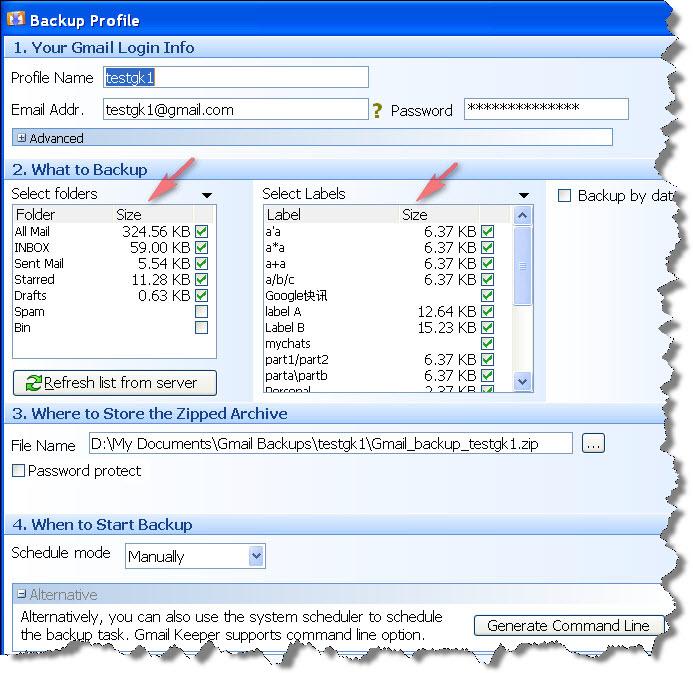
- Show size info for each Gmail folders and Gmail labels. Now in the backup profile setup window you can see the total size of each Gmail folders/labels, with this size info being displayed you can easily to determine how to setup your Gmail backup profiles for an account with large amount of emails.
- The Gmail folder list and Gmail label list can now be enlarged. You can now enlarge the height of the backup profile setup window, as a result, the folder and label lists will be enlarged, this makes it easier to deal with large amount of labels.
What’s Gmail Keeper?
Gmail Keeper is a one-click email and label backup software for Gmail and Google apps accounts, with Gmail Keeper you can simply schedule your backup profiles and then forget about it. Creating local Gmail backup has never been easier.
Download free trial and Create your local Gmail backup today!
New screenshot for the Gmail backup profile settings window:

 RSS
RSS
I have test Gmail Keeper.
The problem is that, the backup is organized by date and no by the labels I can see on my Gmail account adn is very difficult for me to know where is in the backup, the mail I´m searching for. The question is, how can I backup my account and get a simple structure like this?
-Inbox
– Sent
– label1
– label2
– label3
– …
Exactly like I can see on Gmail?
Excuse me for my poor english.
Hi Gotzon,
Thank you for the suggestion, and in the future version of Gmail Keeper there will be a Gmail-like UI for browsing the backup data in a way like the original Gmail UI as you described.
I don’t unremarkably comment but I gotta state regards for the post on this perfect one :D.
Surely, Apple’s instance retail store is by way of distance. It is a really variety of all kinds with programs versus a fairly sorrowful choice a handful for the purpose of Zune. Microsof company is applications, specially inside the realm of exercises, still I am not confident It’s safe to call for to wagered with the success detail aspect is critical for your needs. Ipod could be a even much better determination if so.
hi!,I love your writing very a lot! proportion we be in contact more approximately your post on AOL? I need a specialist on this house to unravel my problem. May be that is you! Taking a look forward to peer you. |
hi!,I like your writing so a good deal! share we communicate far a lot more about your post on AOL? I want a specialist on this location to solve my difficulty. May be that’s you! Looking forward to see you.
You produced some first rate factors there. I seemed on the internet for the difficulty and located most people will go along with together together with your site.
I am curious to find out what weblog platform you might be employing? I’m having some small security problems with my latest web site and I would like to find something a lot more secure. Do you’ve any solutions?
It’s very excellent information and more real facts to provided that post.Thank you for sharing this information.
It’s very excellent information and more real facts to provided that post.Thank you for sharing this information.
Thanks for sharing, this is a fantastic post. Cool.
This post is very good for us.
I really appreciate this post.
I will must recommend others to visit here.
Your voice like from Heaven!
Hi there, the whole thing is going fine here and ofcourse every one is sharing data, that’s actually good,
keep up writing.